Resizing Your Photos for Blogs via Photoshop
So here I am, Monday night, in a King sized bed, in a hotel room, the first time away from my husband since we’ve been married. I’m a little sad so when I packed my clothes I packed one of hubbys shirts sprayed with his cologne. At least I somewhat feel close to him. All my friends who do this on a regular basis, you’re so strong! I’ll quit whining now :).
Where am I and why? I’m on a trip for work. I’ve never traveled for work so this is new and different. I’m not going to lie, I’m a bit sad not getting to go to bed next to my husband. And I’m writing my post for tomorrow tonight. I have nothing to do and am a bit bored. Maybe depending on how tomorrow goes I’ll share with you my trip, but so far, today was mainly just sitting in a car for about 4 hrs.
So I thought I would share with you how to get photos blog read via Photoshop Elements. Remember I already told you how to do this without PSE, now I’ll show how to do it with :).
1. Open your photo. Simple enough!

2. Click on File –> Save for Web


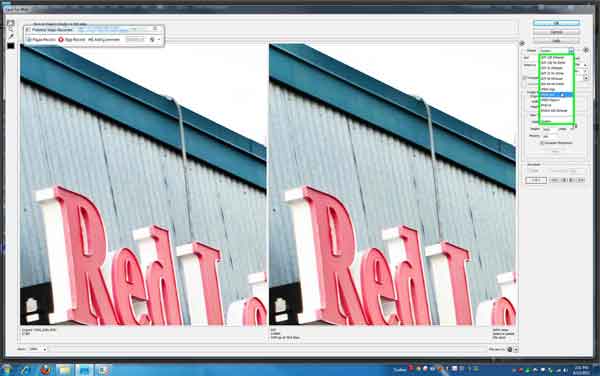
4. Now move down to “new size”. Determine which is larger number – the width or the height. I always put the larger number to 600.

5. Make sure “Constrain Proportions” is clicked. Then hit apply. This will keep your proportions even based off the 600 number.
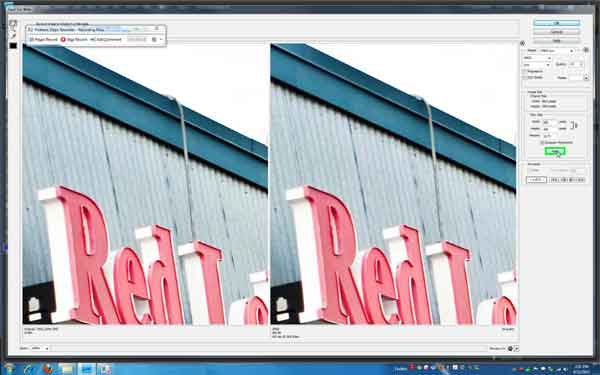
6. One good thing about having the 2 photos is it will show you the original size and the new size down at the bottom of each photo.


8. Now save it in the file you’d like to save it in under the name you choose. I typically save my blog photos in a folder on my desktop called “staging.” Then when I’m finished with it I delete it. I keep the original in a separate folder so they don’t accidentally get discarded.

9. Now that you’ve edited this photo, it will ask you if you want to save changes. I never do because I’ve already saved my changes. This is kind of your opinion in case you haven’t already saved. Then close the photo.

So I am here watching America’s Funniest Home Video’s, still trying to get over this cold. How sad am I that at 8:30 on a Monday night I’m ready for bed?
Peace out and have a lovely Tuesday!
